
I read many papers using PCA to show different clusters of the population but hard to see a step-by-step guide for a beginner like me. Here’re the steps I did.
I use mainly plink (version 1.9) and R (simple plot) on The Phase 2 HapMap as a PLINK fileset. The dataset can be download at http://zzz.bwh.harvard.edu/plink/res.shtml
Entire HapMap (release 23, 270 individuals, 3.96 million SNPs)
– CEU (release 23, 90 individuals, 3.96 million SNPs)
– YRI (release 23, 90 individuals, 3.88 million SNPs)
– JPT+CHB (release 23, 90 individuals, 3.99 million SNPs)
Since the dataset is already in plink format, I can simply run it against plink.
278673251 Sep 2 2008 hapmap_r23a.bed
114426472 Sep 2 2008 hapmap_r23a.bim
7470 Sep 2 2008 hapmap_r23a.fam
Step 1 :
You may get the following error when running the data directly by using plink
Error: .bim file has a split chromosome. Use –make-bed by itself to remedy this.
We can fix this by running the following:
plink --bfile hapmap_r23a --make-bed -out hapmap_r23a_sorted
Step 2 (QC):
You remove any individuals who have less than, say, 95% genotype data (–mind 0.05) and snps with a MAF<0.01 and a HWE P-value<0.00001 as well as a genotype failure rate greater than 0.1 are also removed.
plink --bfile hapmap_r23a_sorted --make-bed --mind 0.1 --maf 0.01 --geno 0.05 --hwe 0.00001 -out hapmap_r23a_cleaned
Step 3 (Prune):
First we prune the dataset to remove highly correlated variants, so that variants can be considered relatively independent, which is one of the assumptions we make in principal component analysis
plink --bfile hapmap_r23a_cleaned --indep-pairwise 50 5 0.2 --out LDprunedout
plink --bfile hapmap_r23a_cleaned --extract LDprunedout.prune.in --make-bed --out hapmap_r23a_ldpruned
Step 4 (PCA)
Execute the following script to do PCA
plink --bfile hapmap_r23a_ldpruned --pca --out pca_result
Files generated:
pca_result.hh
pca_result.eigenvec
pca_result.eigenval
pca_result.log
Step 5 (Plot)
This is straightforward in R.
1. Load the .eigenvec file. E.g. “eigenvec_table <- read.table(‘pca_result.eigenvec’)”
2. Use plot() on the columns you’re interested in. Top eigenvector will be in column 3 while second eigenvector will be in column 4, etc.. Therefore, if you want a set of pairwise plots covering the top 4 eigenvectors, you can use “plot(eigenvec_table[3:6])”.
>eigenvec_table <- read.table('pca_result.eigenvec') >plot(eigenvec_table[3:4])
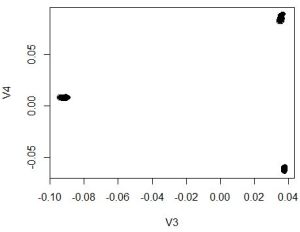
This above plot should be fine and it is similar to the one plotted shown as follow by http://www.well.ox.ac.uk/gabriel-project using HapMap data, just no fancy graphics. Of course, you can plot beautifully by R but it is not target of this article.

Hope this helps!
 GENOME 101